🏎️ 3D 保时捷汽车展示系统

🏎️ 3D 保时捷汽车展示系统

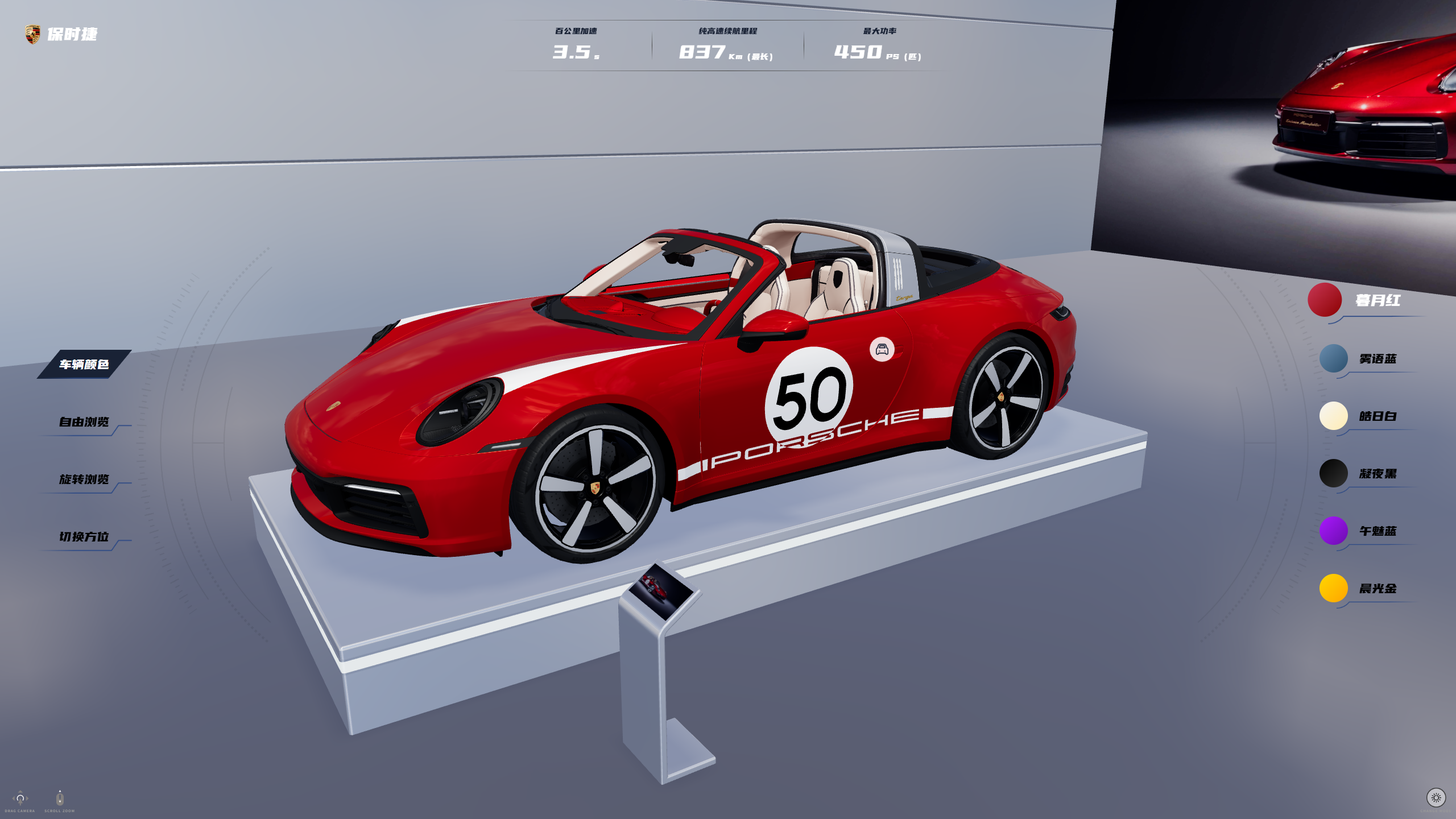
基于 Vue3 + TypeScript + Vite 自主搭建 3D 车展可视化应用,使用 Three.js + three-stdlibGSAP 对从 Blender 导出的 GLTF/GLB 车模与场景 进行二次开发,封装渲染器、相机、灯光、Bloom 管线和 HDR 环境贴图,实现车漆多配色渐变、昼夜模式切换和多视角漫游等沉浸式交互。

  • 封装渲染器、相机、灯光、Bloom 特效与 HDR 环境贴图,实现拟真车漆、高光及环境反射效果;
  • 基于 OrbitControls 封装旋转/缩放/视角切换逻辑,支持顺/逆时针自动旋转、一键切换正后左视等多视角漫游;
  • 对车身、内饰等关键 Mesh 进行精细命名与材质控制,结合颜色面板与 GSAP 动画实现车漆渐变切换;
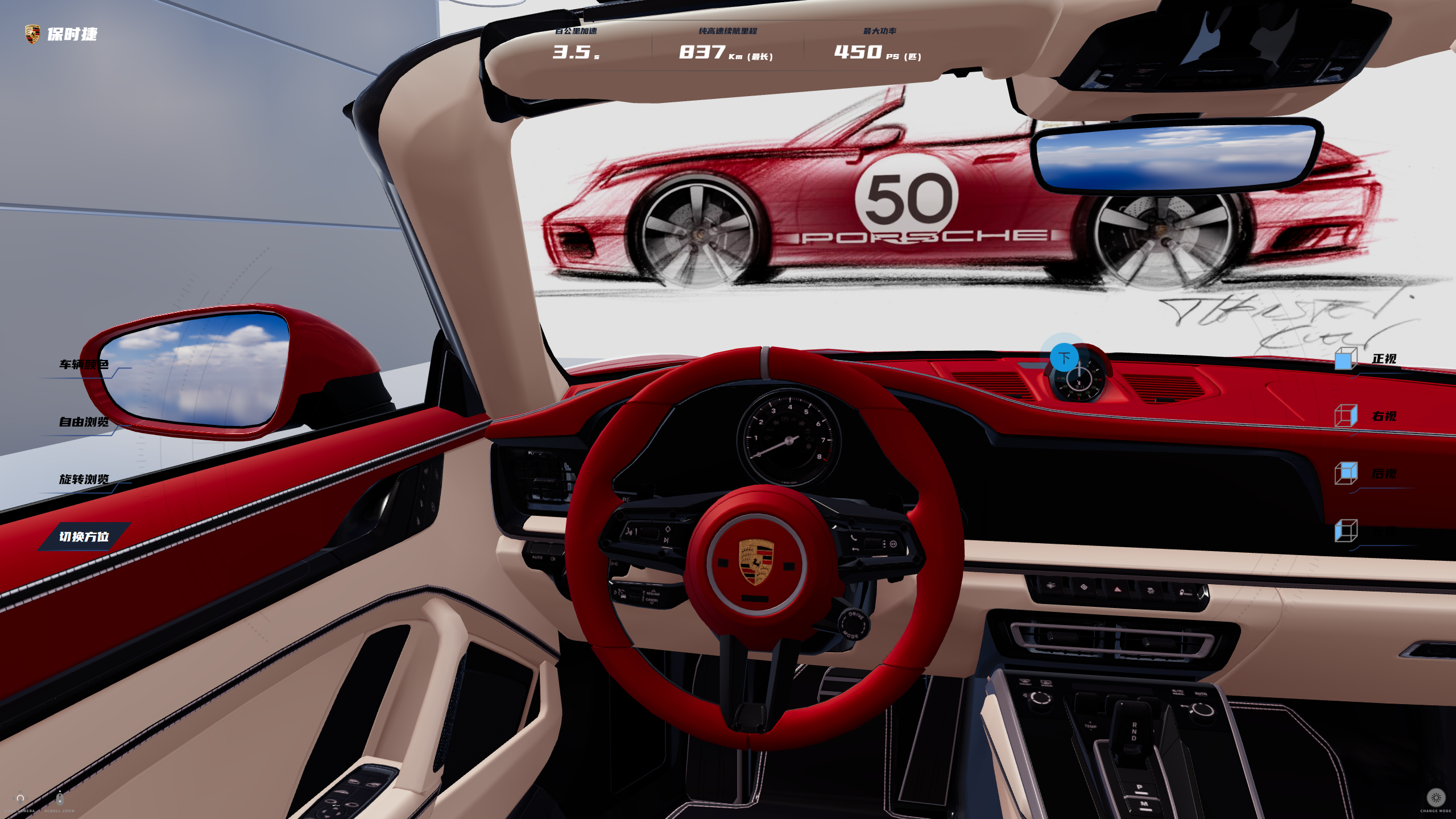
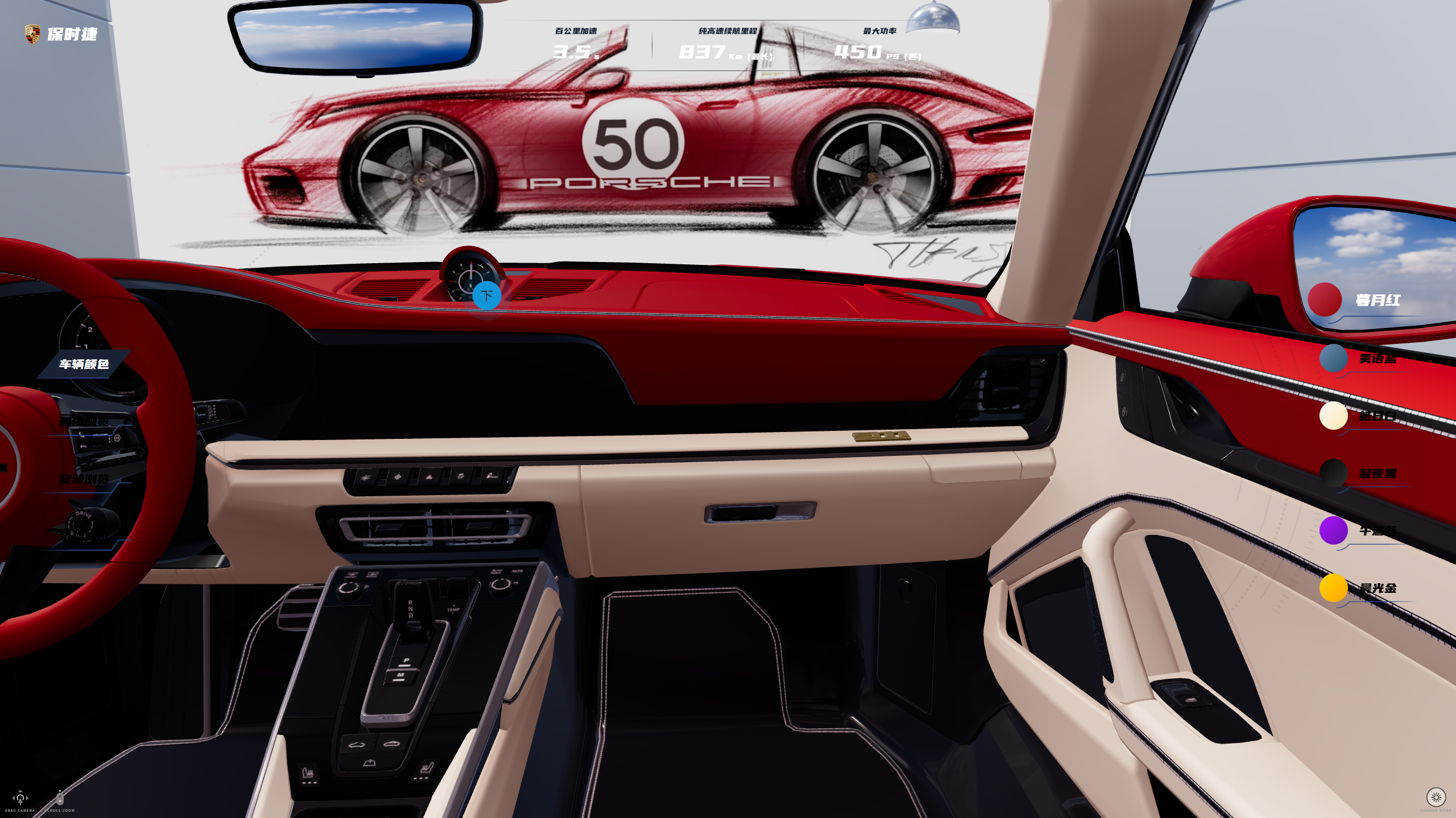
  • 在模型车内外关键部件植入 CSS2D 标签与 Sprite 标记,实现点击进入驾驶舱/下车/中控详情等沉浸式交互;
  • 通过补间动画平滑控制相机运动、车模位移与 UI 动效,显著提升视角切换、进出车内、灯光模式切换等交互流畅度;
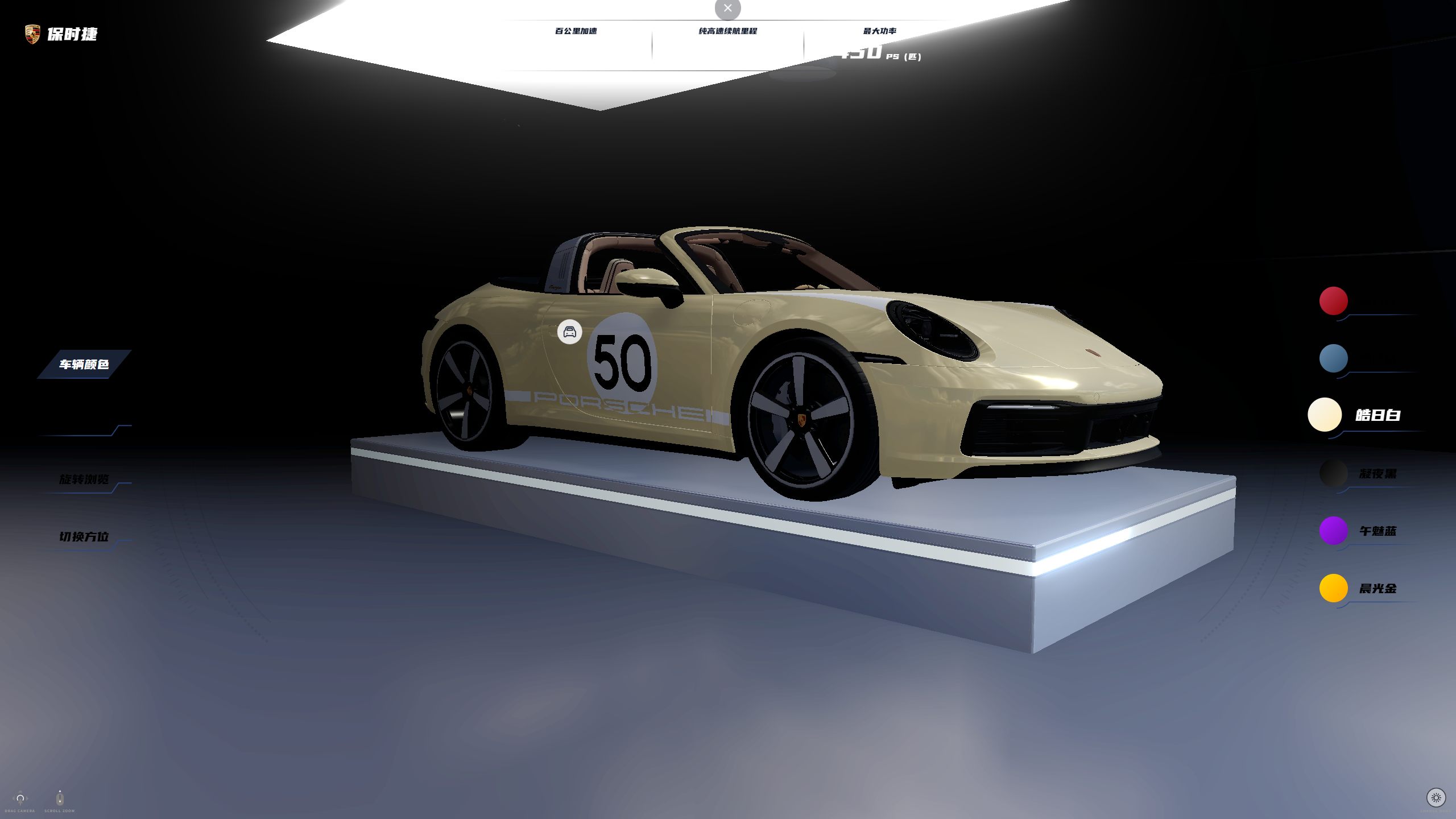
  • 利用 Fog、发光平面与 Bloom 管线组合构建夜间场景,一键切换日/夜模式并同步播放BGM,增强沉浸感与品牌氛围;
  • 通过 AudioContext 精准控制音频片段的起止与时长,为标签点击、模式切换等关键操作增加听觉反馈;
  • 对颜色面板、视角面板、旋转控制与文案区域统一绑定事件,内部调用封装的 Three/GSAP 方法,实现3D功能交互;
  • 在保证曲面光顺与细节表现的前提下严格控制顶点数,减少浏览器端绘制压力。

本项目是一个现代化的 3D 汽车展示系统,支持:

  • 🚗 3D 汽车模型展示与交互

  • 🎨 实时颜色切换(6种配色方案)

  • 🔄 多视角切换(正视、左视、右视、后视)

  • 🌓 日夜模式切换

  • 🎯 车内视角体验(主驾驶、副驾驶)

  • ✨ Bloom 后处理效果

  • 📱 响应式设计(支持桌面、平板、移动设备)

    image-20260317153339810image-20260317154039579image-20260317153612826image-20260317154247412

🛠️ 技术栈

核心框架

  • Vue 3 - 渐进式 JavaScript 框架
  • TypeScript - 类型安全的 JavaScript 超集
  • Vite - 下一代前端构建工具

3D 渲染

  • Three.js (v0.180.0) - 3D 图形库
  • three-stdlib (v2.36.0) - Three.js 标准库扩展
    • GLTFLoader - 3D 模型加载器
    • OrbitControls - 轨道控制器
    • CSS2DRenderer - 2D 标签渲染器
    • RGBELoader - HDR 环境贴图加载器
    • EffectComposer - 后处理合成器
    • UnrealBloomPass - 泛光效果

📁 项目结构

1
2
3
4
5
6
7
8
9
10
11
12
13
14
15
16
17
18
19
20
21
22
23
24
25
26
27
28
29
3d-case-vue-car/
├── public/ # 静态资源
│ └── static/ # 3D 模型和资源文件
│ ├── glbScene.glb # 场景模型
│ ├── gltfCar/ # 汽车模型目录
│ ├── office.hdr # HDR 环境贴图
│ ├── texture/ # 纹理贴图
│ └── *.mp3 # 音效文件
├── src/
│ ├── components/ # 组件目录
│ │ ├── controls.vue # 控制面板组件
│ │ └── footer.vue # 底部控制组件
│ ├── views/ # 视图目录
│ │ └── index.vue # 主视图(3D 场景)
│ ├── utils/ # 工具函数
│ │ └── index.ts # 核心工具函数(800+ 行)
│ ├── store/ # 状态管理
│ │ └── index.ts # Pinia store
│ ├── router/ # 路由配置
│ │ └── index.ts # 路由定义
│ ├── request/ # HTTP 请求
│ │ ├── index.ts # Axios 封装
│ │ └── api.ts # API 接口
│ ├── App.vue # 根组件
│ ├── main.ts # 入口文件
│ └── style.css # 全局样式
├── vite.config.ts # Vite 配置
├── tsconfig.json # TypeScript 配置
└── package.json # 项目依赖

✨ 核心功能详解

1. 3D 场景初始化

项目使用 Three.js 创建 3D 场景,包含渲染器、相机、控制器、光照等核心组件。

1
2
3
4
5
6
7
8
9
10
11
12
13
14
15
16
17
18
19
20
21
22
23
24
25
26
27
28
29
30
31
32
33
34
35
36
37
38
39
40
41
42
43
44
45
46
47
48
49
50
51
52
53
54
55
56
57
58
59
60
61
62
63
const initThree = async () => {
if (!container.value) return;
const width = container.value.clientWidth;
const height = container.value.clientHeight;

renderer.value = new THREE.WebGLRenderer({ antialias: true, alpha: true, depth: true });
initRenderer(renderer.value, container.value);

camera.value = new THREE.PerspectiveCamera(45, width / height, 0.1, 1000);
initCamera(camera.value);

controls.value = new OrbitControls(camera.value, renderer.value.domElement);
initControls(controls.value);

scene.value = new THREE.Scene();
ambientLight.value = new THREE.AmbientLight(0xffffff, 1);
directionalLight.value = new THREE.DirectionalLight(0xffffff, 1);
lightPlane.value = new THREE.Mesh();
initLight(scene.value, ambientLight.value, directionalLight.value, lightPlane.value);

labelRenderer.value = new CSS2DRenderer();
initLabelRenderer(container.value, labelRenderer.value);

initHdr(renderer.value, scene.value);

cssLabels.value = [];

const modelScene = await loadModel(
"/static/glbScene.glb",
BASE_SCALE_FACTOR,
"scene",
scene.value,
);
const sceneLabel = await sceneSet(modelScene);
cssLabels.value.push(...sceneLabel);

const modelCar = await loadModel(
"/static/gltfCar/scene.gltf",
BASE_SCALE_FACTOR * 0.175,
"car",
scene.value,
);
colorSet(modelCar);
const carLabels = await carSet([modelScene, modelCar], controls.value, camera.value);
cssLabels.value.push(...carLabels);

rotateSet(controls.value);

viewSet([modelScene, modelCar], controls.value, camera.value);

// 初始化 bloom
const { composer } = initBloomWebGL(scene.value, camera.value, renderer.value, width, height);
composerWidthBloom.value = composer;
changeLightMode(scene.value, lightPlane.value, composerWidthBloom.value);

animate();

removeControlsMove.value = controlChangeSet(controls.value);

contentItemClick(sceneLabel[0]);

window.addEventListener("resize", handleResize);
};

关键点说明:

  • 使用 WebGLRenderer 创建渲染器,启用抗锯齿和透明度
  • PerspectiveCamera 设置 45 度视角
  • OrbitControls 提供鼠标交互控制
  • 加载 GLB/GLTF 格式的 3D 模型
  • 初始化 HDR 环境贴图提供真实光照
  • 使用 CSS2DRenderer 渲染 HTML 标签

2. 设备自适应相机配置

项目根据设备类型(桌面、平板、移动)自动调整相机参数,确保在不同设备上都有良好的体验。

1
2
3
4
5
6
7
8
9
10
11
12
13
14
15
16
17
18
19
20
21
22
23
24
25
26
27
28
29
30
31
32
33
34
35
36
37
38
39
40
41
42
43
44
45
46
47
48
49
50
51
52
53
54
55
56
57
58
59
60
export function getDeviceSpecificParams() {
const deviceType = detectDevice();
const screenWidth = window.screen.width;
const screenHeight = window.screen.height;
const isLandscape = screenWidth > screenHeight;

let cameraDistance, minDistance, maxDistance;

console.log(deviceType);

switch (deviceType) {
case "mobile":
if (isLandscape) {
// 横屏手机
cameraDistance = 1.8;
minDistance = 0.8;
maxDistance = 2.2;
} else {
// 竖屏手机
cameraDistance = 2.2;
minDistance = 1.0;
maxDistance = 2.8;
}
break;

case "tablet":
if (isLandscape) {
// 横屏平板
cameraDistance = 2.0;
minDistance = 0.9;
maxDistance = 2.3;
} else {
// 竖屏平板
cameraDistance = 2.3;
minDistance = 1.1;
maxDistance = 3.0;
}
break;

case "desktop":
default:
// 桌面设备
cameraDistance = 1.8;
minDistance = 0.8;
maxDistance = 2.2;
break;
}

// 根据屏幕分辨率进一步调整
const resolutionFactor = Math.min(screenWidth / 1920, screenHeight / 1080);
cameraDistance *= resolutionFactor;
minDistance *= resolutionFactor;
maxDistance *= resolutionFactor;

console.log(
`cameraDistance: ${cameraDistance}, minDistance: ${minDistance}, maxDistance: ${maxDistance}`,
);

return { cameraDistance, minDistance, maxDistance };
}

3. 3D 模型加载

使用 GLTFLoader 异步加载模型,并自动计算合适的缩放比例。

1
2
3
4
5
6
7
8
9
10
11
12
13
14
15
16
17
18
19
20
21
22
23
24
25
26
27
28
29
30
31
32
33
34
35
36
37
38
39
40
41
42
43
44
45
46
47
48
49
50
51
52
export function loadModel(
url: string,
scaleFactor: number,
name: string,
scene: Scene,
): Promise<Object3D> {
return new Promise((resolve, reject) => {
const loader = new GLTFLoader();

loader.load(
url,
(gltf) => {
const model = gltf.scene;
model.userData.scaleFactor = scaleFactor || BASE_SCALE_FACTOR;
model.name = name;

const box = new Box3().setFromObject(model);
const size = box.getSize(new Vector3());
const viewportSize = Math.min(window.innerWidth, window.innerHeight);

const finalScaleFactor = model.userData.scaleFactor || BASE_SCALE_FACTOR;
const scale = (viewportSize * finalScaleFactor) / Math.max(size.x, size.y, size.z);
model.scale.set(scale, scale, scale);

model.position.set(0, -0.15, 0);
model.rotation.set(0, 0, 0);

model.traverse((child: any) => {
if (child.isMesh && child.material) {
child.castShadow = true;
child.receiveShadow = true;
child.material.envMapIntensity = 0.25;
}
});

scene.add(model);

resolve(model); // ✅ 返回模型
},
(xhr) => {
if (xhr.lengthComputable) {
// const percentComplete = (xhr.loaded / xhr.total) * 100;
// console.log("加载进度:", `${percentComplete}%`);
}
},
(error) => {
// console.error("加载模型出错:", error);
reject(error); // ❌ 出错时 reject
},
);
});
}

功能说明:

  • 使用 Box3 计算模型包围盒
  • 根据视口大小自动计算缩放比例
  • 为所有网格启用阴影投射和接收
  • 设置环境贴图强度为 0.25

4. HDR 环境贴图

使用 HDR 贴图提供真实的环境光照和反射效果。

1
2
3
4
5
6
7
8
9
10
11
12
13
14
15
16
17
18
19
export function initHdr(renderer: WebGLRenderer, scene: Scene) {
const rgbeLoader = new RGBELoader();
// 仅创建一次 PMREM 生成器
const pmremGenerator = new PMREMGenerator(renderer);
pmremGenerator.compileEquirectangularShader();
rgbeLoader.load("/static/office.hdr", (texture) => {
texture.mapping = EquirectangularReflectionMapping;
texture.minFilter = LinearFilter;
texture.magFilter = LinearFilter;
texture.generateMipmaps = false;
texture.needsUpdate = true;
texture.colorSpace = LinearSRGBColorSpace;
// 生成新的 PMREM 环境图并应用到场景环境光照
const renderTarget = pmremGenerator.fromEquirectangular(texture);
scene.environment = renderTarget.texture;
texture.dispose();
pmremGenerator.dispose();
});
}

技术要点:

  • PMREMGenerator 将 HDR 贴图转换为预过滤的环境贴图
  • EquirectangularReflectionMapping 使用等距圆柱投影
  • 设置完成后释放原始纹理和生成器以节省内存

5. Bloom 泛光效果

使用后处理实现泛光效果,增强视觉表现力。

1
2
3
4
5
6
7
8
9
10
11
12
13
14
15
16
17
18
19
20
21
22
export function initBloomWebGL(
scene: Scene,
camera: PerspectiveCamera,
renderer: WebGLRenderer,
width: number,
height: number,
) {
const renderPass = new RenderPass(scene, camera);
const bloomPass = new UnrealBloomPass(
new Vector2(width, height),
0.75, // strength
0.75, // radius
0.75, // threshold
);

const composer = new EffectComposer(renderer);
composer.addPass(renderPass);
composer.addPass(bloomPass);
composer.renderToScreen = false;

return { composer, bloomPass };
}

参数说明:

  • strength: 泛光强度(0.75)
  • radius: 泛光半径(0.75)
  • threshold: 泛光阈值(0.75)

6. 汽车颜色切换

支持 6 种颜色方案,使用 GSAP 实现平滑的颜色过渡动画。

1
2
3
4
5
6
7
8
9
10
11
12
13
14
15
16
17
18
19
20
21
22
23
24
25
26
27
28
29
30
31
32
33
34
35
export function colorSet(model: Object3D) {
const colors = ["#910300", "#2a4e6c", "#ffecb3", "#111111", "#6a0dad", "#ffa500"];
// eslint-disable-next-line @typescript-eslint/ban-ts-comment
// @ts-ignore
document
.querySelector(".colors")
.querySelectorAll(".item")
.forEach((e, i) => {
e.addEventListener("click", function () {
model.traverse((child: any) => {
if (child.isMesh) {
if (
child.name ===
"bodyPaint_Geo_lodABody_lodA_Porsche_911Targa4SRewardRecycled_2021Paint_Material_0" ||
child.name === "Interior_Geo_lodA_RED_INT_0"
) {
// child.material.color = new THREE.Color(colors[i]);

// 创建目标颜色的Three.js Color对象
const targetColor = new Color(colors[i]);

// 使用GSAP实现颜色平滑过渡
gsap.to(child.material.color, {
r: targetColor.r, // 目标红色通道值(0-1)
g: targetColor.g, // 目标绿色通道值(0-1)
b: targetColor.b, // 目标蓝色通道值(0-1)
duration: 0.5, // 动画持续时间(秒)
ease: "power2.inOut", // 缓动函数,实现平滑过渡
});
}
}
});
});
});
}

颜色方案:

  1. 暮月红 (#910300)
  2. 雾语蓝 (#2a4e6c)
  3. 皓日白 (#ffecb3)
  4. 凝夜黑 (#111111)
  5. 午魅蓝 (#6a0dad)
  6. 晨光金 (#ffa500)

7. 车内视角切换

实现主驾驶、副驾驶和下车视角的平滑切换,使用 GSAP 动画。

1
2
3
4
5
6
7
8
9
10
11
12
13
14
15
16
17
18
19
20
21
22
23
24
25
26
27
28
29
30
31
32
33
34
35
36
37
38
39
40
41
42
43
44
45
46
47
48
49
50
51
52
53
54
55
56
57
58
59
60
61
62
63
64
65
66
67
68
69
70
71
72
73
74
75
76
77
78
79
80
81
82
83
84
85
86
87
88
89
90
91
92
93
94
95
96
97
98
99
100
101
102
103
104
105
106
107
108
109
110
111
112
113
114
115
116
117
118
119
120
121
122
123
124
125
126
127
128
129
130
131
132
133
134
135
136
137
138
139
140
141
142
143
144
145
146
147
148
149
150
151
152
153
export function carSet(
models: Object3D[],
controls: OrbitControls,
camera: PerspectiveCamera,
): Promise<Object3D[]> {
return new Promise((resolve) => {
const modelCar = models.filter((e) => e.name === "car")[0];
const modelScene = models.filter((e) => e.name === "scene")[0];

// 初始化标签数组
const modelLabels: CSS2DObject[] = [];
let joinIsDriver = true; // 判断是否从主驾驶进入车内

modelCar.traverse((child: any) => {
if (child.isMesh && child.material) {
// 镜子反光
if (child.name === "Coloured_Geo_lodA_MIRROR_0") {
child.material.metalness = 1.5;
child.material.color.set(0xffffff);
}

// 创建主副驾驶下车标签元素
const labelUrl = "https://s3.jimumeta.com/jmyd1/dist/icons/c.png"; // 默认值
let labelPosition = [0, 0, 0];
// 创建标签DOM元素
const labelImg = document.createElement("img");
labelImg.id = child.name;
labelImg.src = labelUrl;
labelImg.style.width = "44px";
labelImg.style.zIndex = "1000";
labelImg.style.cursor = "pointer";
labelImg.style.pointerEvents = "auto";
if (child.name === "Interior_Geo_lodA_BEIGE_INT_0") {
labelPosition = [0.75, 0.55, -0.45];
labelImg.title = "主驾驶";
}
if (
child.name === "Badge_Geo_lodA_Porsche_911Targa4SRewardRecycled_2021BadgeA_Material_0"
) {
labelPosition = [-0.75, 0.55, -0.45];
labelImg.title = "副驾驶";
labelImg.style.width = "0px";
}
if (
child.name ===
"Interior_Geo_lodA_Porsche_911Targa4SRewardRecycled_2021InteriorA_Material_0"
) {
labelPosition = [0, 0.725, 0.75];
labelImg.src = "/static/out.png";
labelImg.title = "下车";
labelImg.style.width = "0px";
}
if (labelPosition.some((v) => v !== 0)) {
// 创建CSS2D对象
const label = new CSS2DObject(labelImg);
// 设置标签位置
// eslint-disable-next-line @typescript-eslint/ban-ts-comment
// @ts-ignore
label.position.set(...labelPosition);
// 将标签添加到mesh
child.add(label);
// 存储标签引用
modelLabels.push(label);
}
}
});

// 添加点击事件
const outCar = modelLabels.find((e) => e.element.title === "下车");
modelLabels.forEach((labelImg) => {
labelImg.element.addEventListener("click", function (e: any) {
e.stopPropagation();
if (e.target.id === "Interior_Geo_lodA_BEIGE_INT_0") {
joinIsDriver = true;
gsap.to([modelCar.position, modelScene.position], {
x: detectDevice() === "desktop" ? -0.075 : -0.15,
y: detectDevice() === "desktop" ? -0.275 : -0.5,
z: detectDevice() === "desktop" ? 0.05 : 0.1,
duration: 1.5,
ease: "power2.inOut",
onStart: () => {
// 相机动画
animateCameraTo(controls, camera, new Vector3(0, 0.0155, -0.05), false, false);
if (outCar) {
gsap.to(outCar.element, {
width: 88,
duration: 1.5,
});
}
playClip("/static/day.mp3", 0, 1);
},
});
}

if (
e.target.id === "Badge_Geo_lodA_Porsche_911Targa4SRewardRecycled_2021BadgeA_Material_0"
) {
joinIsDriver = false;
gsap.to([modelCar.position, modelScene.position], {
x: detectDevice() === "desktop" ? 0.075 : 0.15,
y: detectDevice() === "desktop" ? -0.275 : -0.5,
z: detectDevice() === "desktop" ? 0.05 : 0.1,
duration: 1.5,
ease: "power2.inOut",
onStart: () => {
// 相机动画
animateCameraTo(controls, camera, new Vector3(0, 0.0155, -0.05), false, false);
if (outCar) {
gsap.to(outCar.element, {
width: 88,
duration: 1.5,
});
}
playClip("/static/day.mp3", 0, 1);
},
});
}

if (
e.target.id ===
"Interior_Geo_lodA_Porsche_911Targa4SRewardRecycled_2021InteriorA_Material_0"
) {
gsap.to([modelCar.position, modelScene.position], {
x: 0,
y: -0.15,
z: 0,
duration: 1.5,
ease: "power2.inOut",
onStart: () => {
// 相机动画
animateCameraTo(
controls,
camera,
new Vector3(joinIsDriver ? 2.1 : -2.1, 0, 0),
false,
true,
);
if (outCar) {
gsap.to(outCar.element, {
width: 0,
duration: 1.5,
});
}
playClip("/static/day.mp3", 0, 1);
},
});
}
});
});

resolve(modelLabels);
});
}

8. 相机动画控制

使用 GSAP 实现平滑的相机位置过渡。

1
2
3
4
5
6
7
8
9
10
11
12
13
14
15
16
17
18
19
20
21
22
23
24
25
26
27
28
29
30
31
32
33
34
35
export function animateCameraTo(
controls: OrbitControls,
camera: PerspectiveCamera,
targetPosition: Vector3,
isInitPosition = false,
restDistance = true,
) {
// 如果已有动画正在运行,先杀死它
if (cameraTween) cameraTween.kill();

// 设置控制参数
if (!isInitPosition) {
controls.minDistance = 0.05;
}

controls.autoRotate = false;

cameraTween = gsap.to(camera.position, {
x: targetPosition.x,
y: targetPosition.y,
z: targetPosition.z,
duration: 1.5, // 动画持续时间
ease: "power2.inOut", // 缓动函数
onComplete: () => {
// 动画完成后确保位置精确
camera.position.copy(targetPosition);
if (restDistance) {
// eslint-disable-next-line @typescript-eslint/ban-ts-comment
// @ts-ignore
controls.minDistance = parseFloat(localStorage.getItem("minDistance"));
}
controls.update();
},
});
}

9. 日夜模式切换

实现场景光照模式的切换,包括雾效和泛光效果。

1
2
3
4
5
6
7
8
9
10
11
12
13
14
15
16
17
let night = false;

export function changeLightMode(
scene: Scene,
lightPlane: Mesh,
composerWidthBloom: EffectComposer,
) {
const lightModeEl = document.querySelector<HTMLElement>("#night");
lightModeEl &&
lightModeEl.addEventListener("click", function () {
night = !night;
scene.fog = night ? new FogExp2(0x000000, detectDevice() === "tablet" ? 0.4 : 0.7) : null;
lightPlane.visible = night;
composerWidthBloom.renderToScreen = night;
playClip(night ? "/static/night.mp3" : "/static/day.mp3", 0, 1);
});
}

功能说明:

  • 夜间模式启用指数雾效(FogExp2
  • 显示发光平面增强夜间氛围
  • 启用 Bloom 后处理效果
  • 播放对应的音效

10. 自动旋转控制

提供顺时针、逆时针和停止旋转功能。

1
2
3
4
5
6
7
8
9
10
11
12
13
14
15
16
17
18
19
20
21
22
export function rotateSet(controls: OrbitControls) {
const sszRotateEl = document.querySelector<HTMLElement>("#sszRotate");
const nszRotateEl = document.querySelector<HTMLElement>("#nszRotate");
const stopRotateEl = document.querySelector<HTMLElement>("#stopRotate");

sszRotateEl &&
sszRotateEl.addEventListener("click", function () {
controls.autoRotate = true;
controls.autoRotateSpeed = 1;
});

nszRotateEl &&
nszRotateEl.addEventListener("click", function () {
controls.autoRotate = true;
controls.autoRotateSpeed = -1;
});

stopRotateEl &&
stopRotateEl.addEventListener("click", function () {
controls.autoRotate = false;
});
}

11. 音效播放

使用 Web Audio API 播放音效片段。

1
2
3
4
5
6
7
8
9
10
11
12
13
export function playClip(url = "/static/bgm.mp3", start = 25.5, duration = 0.5) {
const ctx = new AudioContext();
fetch(url)
.then((r) => r.arrayBuffer())
.then((buffer) => ctx.decodeAudioData(buffer))
.then((decoded) => {
const src = ctx.createBufferSource();
src.buffer = decoded;
src.connect(ctx.destination);
src.start(0, start, duration);
src.onended = () => src.disconnect();
});
}

功能说明:

  • 使用 AudioContext 创建音频上下文
  • 支持从指定时间点开始播放
  • 支持播放指定时长的音频片段

🎮 交互控制

鼠标控制

  • 左键拖拽:旋转视角
  • 滚轮:缩放模型
  • 右键拖拽:旋转视角(备用)

键盘控制

  • 通过控制面板显示操作提示

UI 控制

  • 颜色切换:点击右侧颜色选项
  • 视角切换:点击右侧视角按钮(正视、左视、右视、后视)
  • 自动旋转:点击旋转控制按钮
  • 日夜模式:点击右下角模式切换按钮

📱 响应式设计

项目自动检测设备类型并调整参数:

1
2
3
4
5
6
7
8
9
10
11
12
13
14
15
16
17
export function detectDevice() {
const userAgent = navigator.userAgent;
const screenWidth = window.screen.width;
const screenHeight = window.screen.height;
const isMobile = /Android|webOS|iPhone|iPad|iPod|BlackBerry|IEMobile|Opera Mini/i.test(userAgent);
const isTablet =
/iPad|Android(?=.*\bMobile\b)(?=.*\bSafari\b)/i.test(userAgent) ||
(screenWidth >= 768 && screenHeight >= 1024);

if (isTablet) {
return "tablet";
} else if (isMobile) {
return "mobile";
} else {
return "desktop";
}
}

🎨 UI 组件

Controls 组件

控制面板组件,显示操作提示和模式切换按钮。

1
2
3
4
5
6
7
8
9
10
11
12
13
14
15
16
17
18
19
20
21
22
23
24
25
26
27
28
29
30
31
32
33
34
35
36
37
38
39
40
41
42
43
44
45
46
47
48
49
50
51
52
53
54
55
56
57
58
59
60
61
<script setup lang="ts">
import { reactive, computed } from "vue";

interface Control {
id: string;
desc: string;
iconClass: string;
style?: Record<string, string>;
}

// 控件数组
const controls = reactive<Control[]>([
{
id: "ctrlKeys",
desc: "Car Controls",
iconClass: "",
},
{
id: "ctrlMouse",
desc: "Drag camera",
iconClass: "mouseIcon",
},
{
id: "ctrlScroll",
desc: "Scroll zoom",
iconClass: "scrollIcon",
},
{
id: "ctrlView",
desc: "Back View",
iconClass: "ctrlIcoView",
style: { right: "10px" },
},
]);

const props = defineProps({
keyVisible: { type: Boolean, default: true },
mouseVisible: { type: Boolean, default: true },
scrollVisible: { type: Boolean, default: true },
viewVisible: { type: Boolean, default: true },
});

const visibleControls = computed(() =>
controls.filter((ctrl) => {
if (ctrl.id === "ctrlKeys") return props.keyVisible;
if (ctrl.id === "ctrlMouse") return props.mouseVisible;
if (ctrl.id === "ctrlScroll") return props.scrollVisible;
if (ctrl.id === "ctrlView") return props.viewVisible;
return true;
}),
);

// 点击事件
import { defineEmits } from "vue";

const emit = defineEmits<{ (e: "ctrl-click", ctrl: Control): void }>();

function handleClick(ctrl: Control) {
emit("ctrl-click", ctrl);
}
</script>

🔄 资源清理

项目在组件卸载时进行完整的资源清理:

1
2
3
4
5
6
7
8
9
10
11
12
13
14
15
16
17
18
19
20
21
22
23
24
25
26
27
28
29
30
31
32
33
34
35
36
37
38
39
40
onBeforeUnmount(() => {
window.removeEventListener("resize", handleResize);

if (animationId) {
cancelAnimationFrame(animationId);
}

if (controls.value) {
controls.value.dispose();
}

if (renderer.value) {
renderer.value.dispose();
}

if (removeControlsMove.value) {
removeControlsMove.value(); // ✅ 调用卸载函数移除事件
removeControlsMove.value = null; // 防止重复调用
}

if (!scene.value) return;
// 清理场景中的对象
while (scene.value.children.length > 0) {
const object = scene.value.children[0];
if ((object as THREE.Mesh).isMesh) {
const mesh = object as THREE.Mesh;
if (mesh.geometry) {
mesh.geometry.dispose();
}
if (mesh.material) {
if (Array.isArray(mesh.material)) {
mesh.material.forEach((material) => material.dispose());
} else {
mesh.material.dispose();
}
}
}
scene.value.remove(object);
}
});